My Take on a Tmux ‘Sessionizer’
2026-09-21 at 21:45:02 PDT
If you spend a significant amount of time within a terminal, especially when managing multiple projects, tasks, or other responsibilities, you quickly realize that it’s extremely important to have a sane and easy to reach for session management system.
Originally, I attempted to take care of this by simply creating new tmux
sessions when necessary, often loosely correlated to a feature, project, or some
other unit of work. This can be achieved by simply creating a new detached
session with tmux new-session -d -s session-name, and then connecting to it
with tmux a -t session-name. Once inside that session, you can do things such
as tmux ls to view all other active sessions, and
tmux switch-client -t other-session
to attach to a different session.
So, this is great as it lets us manage sessions concurrently, keeping each ‘environment’ clean from distraction. However, it is certainly not ergonomic and can definitely be improved. The first step I took was to write a shell function that made it easier to attach to an existing session, and create one if it does not already exist:
ta() {
    local session="$1"

    tmux -u has-session -t "$session" 2>/dev/null ||
        tmux -u new-session -d -s "$session" -c "$PWD"

    tmux -u switch-client -t "$session" 2>/dev/null ||
        tmux -u attach-session -t "$session"
}
Now I can just run ta some-dir-name and be attached to a session named
some-dir-name, starting in the current directory.
This helped, but I still
had to keep track of all my currently open sessions.
Obviously tmux ls helps
with this, but we can make this better:
ts() {
    local session
    session=$(
            tmux -u list-sessions -F '#S' |
            fzf --tmux center,40%,30%
    )

    [[ -n "$session" ]] && ta "$session"
}
This displays a fuzzy finder of all my currently open sessions, and makes it easy to jump to whatever session I might need.
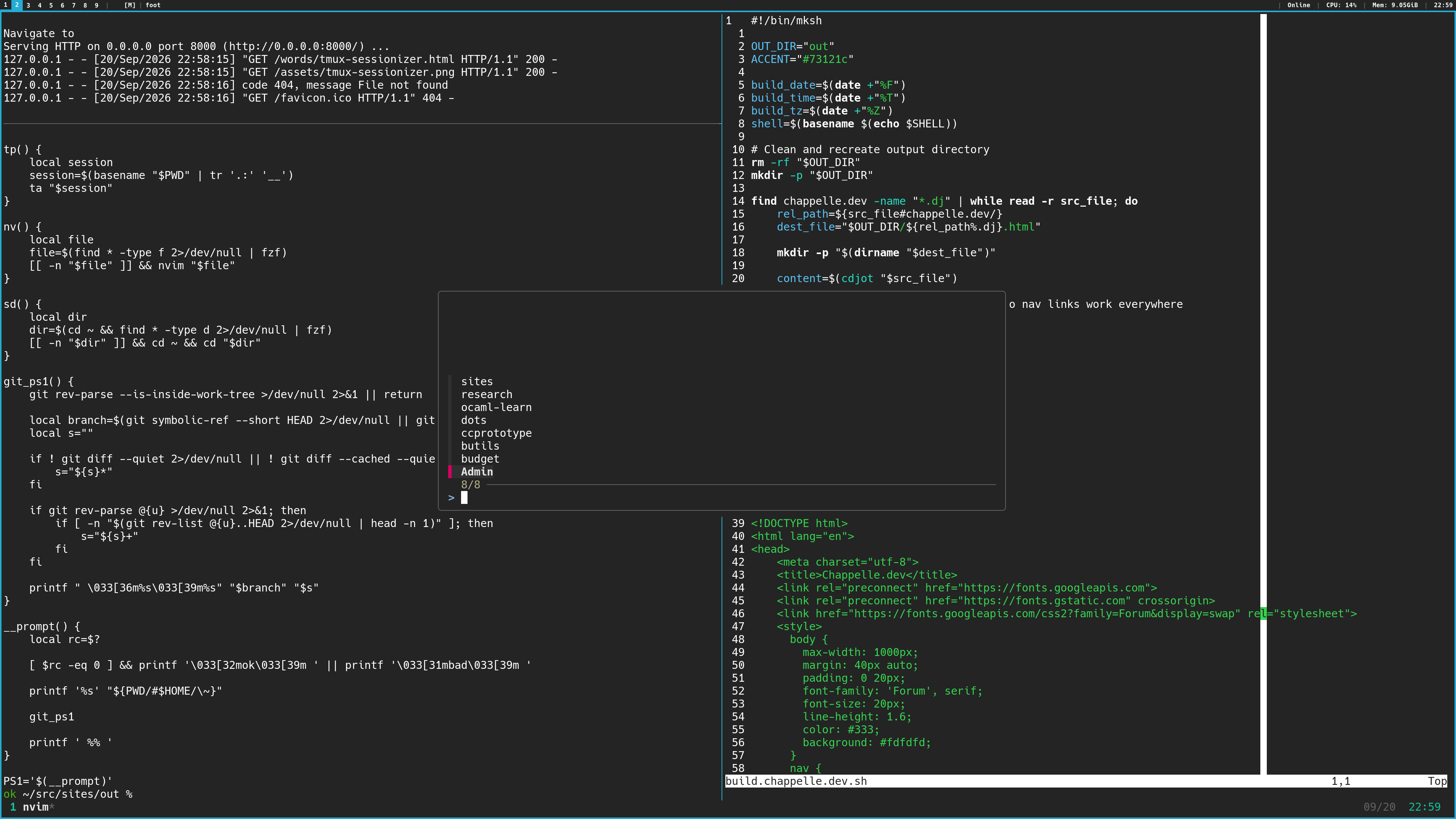
Creating new sessions still
didn’t quite feel seamless, so I came up with another function, building on the
behavior of the ta function:
tp() {
    local session
    session=$(basename "$PWD" | tr '.:' '__')
    ta "$session"
}
Now I can just run tp in any directory that has some significance to me, and
voilà, a new session is created that refers to that directory.
I got to this point over the course of a month or two while working in a job that really forced me to be able to quickly switch between features, ci runs, benchmarks, and multiple projects. It felt good, and I actually stuck with this pretty minimal interface for a sizeable amount of time. However, I knew that there was surely more efficiency to be found. When I had some freetime I set out to find some further optimizations, and I came up with this:
tt() {
    local new_session
    new_session=$(
                find ~ -type d 2>/dev/null | fzf --tmux center,40%,30%
    )

    [[ -n "$new_session" ]] && cd "$new_session" && tp
}
This lets me fuzzy-find for any directory below my home directory, and have a new session automatically created there. This might not seem super useful, but I’ve found it helps in a few scenarios, such as:
- Quickly recreating a sessionizer state after a reboot or tmux server crash
- Quickly opening up projects I haven’t touched for a while
Furthermore, I wanted to integrate this into my tmux binds so that I could access my finder even when I wasn’t at a shell:
bind-key s run-shell "$SHELL -ic ts"
bind-key t run-shell "$SHELL -ic tt"
That really put the icing on the cake, and I can now move throughout my projects at (blazingly) fast speeds. It’s very satisfying to iterate on a productivity system over the course of a few months; I’ve enjoyed understanding what the hot-paths to my usage are and reasoning about how to represent them within the sh syntax.
Don’t hesitate to try these out, or better yet think about what you commonly find yourself doing in your terminal and try to find ways to speed it up.
Full excerpt from my ~/.mkshrc, with some bonuses unrelated to this article:
HISTFILE="$HOME/.mksh_history"
HISTSIZE=5000

alias ls="ls -l --color=auto"

ssh() {
        if ! rbw unlocked >/dev/null 2>&1; then
                echo "!!!!! vault is locked !!!!!" >&2
                return 1
        fi

        command ssh "$@"
}

ta() {
    local session="$1"

    tmux -u has-session -t "$session" 2>/dev/null ||
        tmux -u new-session -d -s "$session" -c "$PWD"

    tmux -u switch-client -t "$session" 2>/dev/null ||
        tmux -u attach-session -t "$session"
}

ts() {
    local session
    session=$(
            tmux -u list-sessions -F '#S' |
            fzf --tmux center,40%,30%
    )

    [[ -n "$session" ]] && ta "$session"
}

tt() {
    local new_session
    new_session=$(
                find ~ -type d 2>/dev/null | fzf --tmux center,40%,30%
    )

    [[ -n "$new_session" ]] && cd "$new_session" && tp
}

tls() {
        tmux -u ls
}

tp() {
    local session
    session=$(basename "$PWD" | tr '.:' '__')
    ta "$session"
}

nv() {
    local file
    file=$(find * -type f 2>/dev/null | fzf)
    [[ -n "$file" ]] && nvim "$file"
}

sd() {
    local dir
    dir=$(cd ~ && find * -type d 2>/dev/null | fzf)
    [[ -n "$dir" ]] && cd ~ && cd "$dir"
}

git_ps1() {
    git rev-parse --is-inside-work-tree >/dev/null 2>&1 || return

    local branch=$(git symbolic-ref --short HEAD 2>/dev/null || git rev-parse --short HEAD 2>/dev/null)
    local s=""

    if ! git diff --quiet 2>/dev/null || ! git diff --cached --quiet 2>/dev/null; then
        s="${s}*"
    fi

    if git rev-parse @{u} >/dev/null 2>&1; then
        if [ -n "$(git rev-list @{u}..HEAD 2>/dev/null | head -n 1)" ]; then
            s="${s}+"
        fi
    fi

    printf " \033[36m%s\033[39m%s" "$branch" "$s"
}

__prompt() {
    local rc=$?

    [ $rc -eq 0 ] && printf '\033[32mok\033[39m ' || printf '\033[31mbad\033[39m '

    printf '%s' "${PWD/#$HOME/\~}"

    git_ps1

    printf ' %% '
}

PS1='$(__prompt)'